Deeplinks

Documentation Index
Fetch the complete documentation index at: https://docs.qoder.com/llms.txt
Use this file to discover all available pages before exploring further.
Deeplinks
Deeplinks 允许您通过简单的 URL 与他人分享 Agentic Chat 提示词、Quest 任务、规则和 MCP 服务器配置。当您点击深链时,IDE 会打开并显示确认对话框,展示即将添加的内容。在您审核并确认前,深链不会自动执行任何操作。
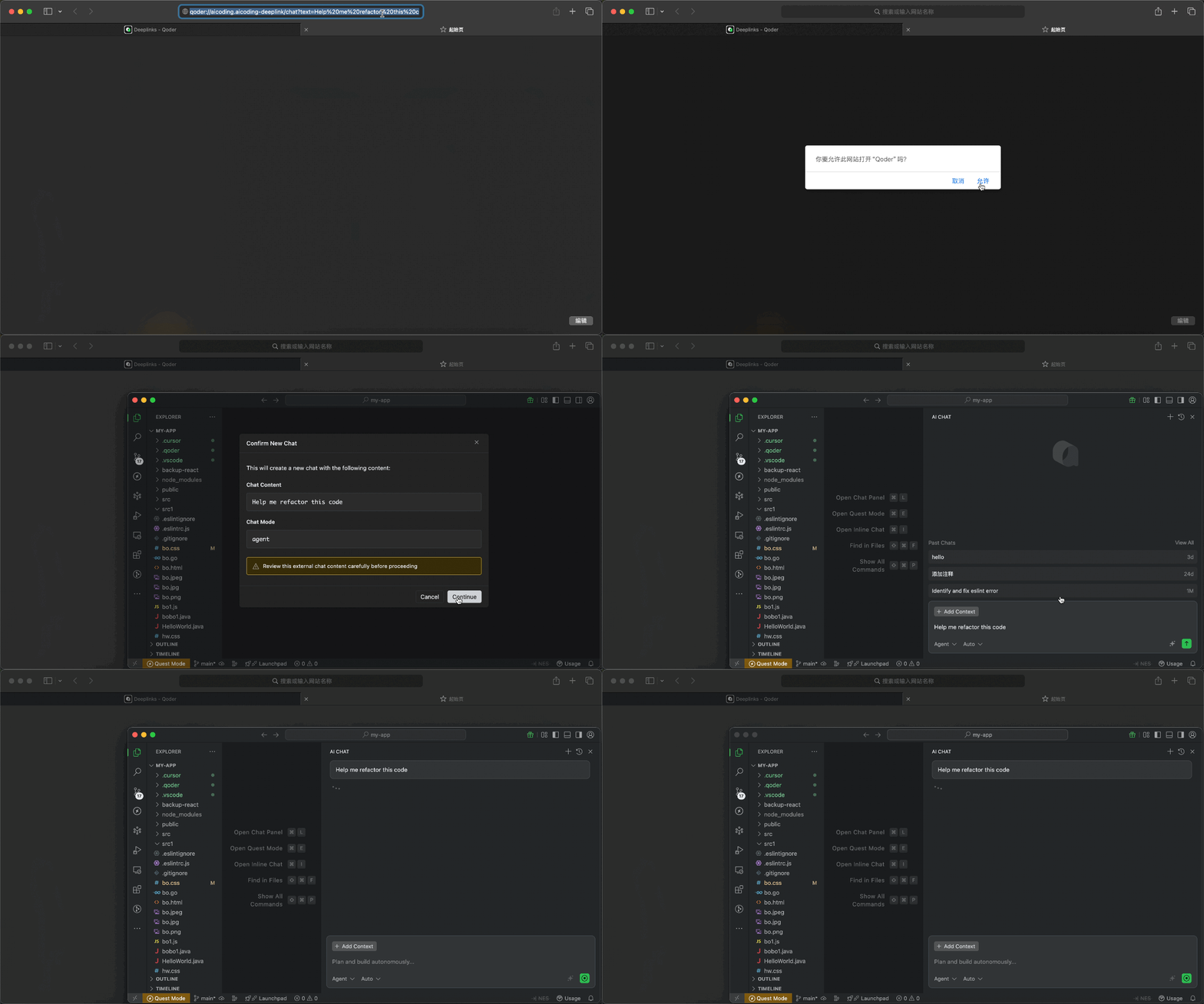
URL 格式
{scheme}://{host}/{path}?{parameters}
| 组成部分 | 说明 | 示例 |
|---|---|---|
scheme |
协议 | qoder |
host |
深链处理器标识 | aicoding.aicoding-deeplink |
path |
操作路径 | /chat, /quest, /rule, /mcp/add |
parameters |
URL 查询参数 | text=hello&mode=agent |
可用的深链类型
| 路径 | 说明 | 是否需要登录 |
|---|---|---|
/chat |
创建智能会话 | 是 |
/quest |
创建 Quest 任务 | 是 |
/rule |
创建规则 | 否 |
/mcp/add |
添加 MCP 服务器 | 否 |
创建智能会话 /chat
分享可直接用于聊天的提示词。点击聊天深链后,IDE 会打开并在聊天输入框中预填充指定内容。
URL 格式
qoder://aicoding.aicoding-deeplink/chat?text={prompt}&mode={mode}
参数说明
| 参数 | 是否必需 | 说明 |
|---|---|---|
text |
是 | 要预填充的提示内容 |
mode |
否 | 聊天模式:agent 或 ask(默认:用户当前模式) |
示例
qoder://aicoding.aicoding-deeplink/chat?text=%E5%B8%AE%E6%88%91%E9%87%8D%E6%9E%84%E8%BF%99%E6%AE%B5%E4%BB%A3%E7%A0%81&mode=agent
生成链接代码
“`typescript theme={null}
function generateChatDeeplink(text: string, mode?: ‘agent’ | ‘ask’): string {
if (!text) {
throw new Error(‘缺少必需参数: text’);
}
  const url = new URL('qoder://aicoding.aicoding-deeplink/chat');
  url.searchParams.set('text', text);
  if (mode) {
    url.searchParams.set('mode', mode);
  }

  return url.toString();
}

// 示例
const deeplink = generateChatDeeplink('帮我重构这段代码以提升性能', 'agent');
console.log(deeplink);
// qoder://aicoding.aicoding-deeplink/chat?text=%E5%B8%AE%E6%88%91...&mode=agent
```
“`python theme={null}
from urllib.parse import urlencode
def generate_chat_deeplink(text: str, mode: str = None) -> str:
    if not text:
        raise ValueError('缺少必需参数: text')

    params = {'text': text}
    if mode:
        params['mode'] = mode

    return f"qoder://aicoding.aicoding-deeplink/chat?{urlencode(params)}"

# 示例
deeplink = generate_chat_deeplink('帮我重构这段代码以提升性能', 'agent')
print(deeplink)
```
创建 Quest 任务 /quest
分享 Quest 任务,让 AI 自主完成复杂的开发任务。Quest 模式允许 AI 规划、执行并迭代任务,最大限度减少人工干预。
URL 格式
qoder://aicoding.aicoding-deeplink/quest?text={description}&agentClass={agentClass}
参数说明
| 参数 | 是否必需 | 说明 |
|---|---|---|
text |
是 | 任务描述 |
agentClass |
否 | 执行模式:LocalAgent(默认)、LocalWorktree 或 RemoteAgent |
执行模式
| 模式 | 说明 |
|---|---|
LocalAgent |
在当前工作区执行 |
LocalWorktree |
在隔离的 git worktree 中执行 |
RemoteAgent |
在远程服务器执行 |
示例
qoder://aicoding.aicoding-deeplink/quest?text=%E5%AE%9E%E7%8E%B0JWT%E7%94%A8%E6%88%B7%E8%AE%A4%E8%AF%81&agentClass=LocalWorktree
生成链接代码
“`typescript theme={null}
type AgentClass = ‘LocalAgent’ | ‘LocalWorktree’ | ‘RemoteAgent’;
function generateQuestDeeplink(text: string, agentClass?: AgentClass): string {
  if (!text) {
    throw new Error('缺少必需参数: text');
  }

  const url = new URL('qoder://aicoding.aicoding-deeplink/quest');
  url.searchParams.set('text', text);
  if (agentClass) {
    url.searchParams.set('agentClass', agentClass);
  }

  return url.toString();
}

// 示例
const deeplink = generateQuestDeeplink('实现基于 JWT 的用户认证系统', 'LocalWorktree');
console.log(deeplink);
```
“`python theme={null}
from urllib.parse import urlencode
def generate_quest_deeplink(text: str, agent_class: str = None) -> str:
    if not text:
        raise ValueError('缺少必需参数: text')

    params = {'text': text}
    if agent_class:
        params['agentClass'] = agent_class

    return f"qoder://aicoding.aicoding-deeplink/quest?{urlencode(params)}"

# 示例
deeplink = generate_quest_deeplink('实现基于 JWT 的用户认证系统', 'LocalWorktree')
print(deeplink)
```
创建规则 /rule
分享规则来指导 AI 行为。规则可以定义代码规范、项目约定或 AI 响应的特定指令。
URL 格式
qoder://aicoding.aicoding-deeplink/rule?name={ruleName}&text={ruleContent}
参数说明
| 参数 | 是否必需 | 说明 |
|---|---|---|
name |
是 | 规则名称(用作文件名) |
text |
是 | 规则内容 |
示例
qoder://aicoding.aicoding-deeplink/rule?name=typescript-conventions&text=%E5%A7%8B%E7%BB%88%E4%BD%BF%E7%94%A8%E4%B8%A5%E6%A0%BC%E7%9A%84TypeScript%E7%B1%BB%E5%9E%8B
生成链接代码
“`typescript theme={null}
function generateRuleDeeplink(name: string, text: string): string {
if (!name || !text) {
throw new Error(‘缺少必需参数: name 和 text’);
}
  const url = new URL('qoder://aicoding.aicoding-deeplink/rule');
  url.searchParams.set('name', name);
  url.searchParams.set('text', text);

  return url.toString();
}

// 示例
const deeplink = generateRuleDeeplink(
  'typescript-conventions',
  `始终使用严格的 TypeScript 类型。
避免使用 'any' 类型。
对象类型优先使用 interface 而非 type。`
);
console.log(deeplink);
```
“`python theme={null}
from urllib.parse import urlencode
def generate_rule_deeplink(name: str, text: str) -> str:
    if not name or not text:
        raise ValueError('缺少必需参数: name 和 text')

    params = {'name': name, 'text': text}
    return f"qoder://aicoding.aicoding-deeplink/rule?{urlencode(params)}"

# 示例
deeplink = generate_rule_deeplink(
    'typescript-conventions',
    """始终使用严格的 TypeScript 类型。
避免使用 'any' 类型。
对象类型优先使用 interface 而非 type。"""
)
print(deeplink)
```
添加 MCP 服务器 /mcp/add
分享 MCP (Model Context Protocol) 服务器配置。MCP 服务器通过提供额外的工具和上下文来源来扩展 AI 能力。
URL 格式
qoder://aicoding.aicoding-deeplink/mcp/add?name={serverName}&config={base64EncodedConfig}
参数说明
| 参数 | 是否必需 | 说明 |
|---|---|---|
name |
是 | MCP 服务器名称 |
config |
是 | Base64 编码的 MCP server JSON 配置 |
注意:配置必须包含
command或url其中之一。
示例
qoder://aicoding.aicoding-deeplink/mcp/add?name=postgres&config=JTdCJTIyY29tbWFuZCUyMiUzQSUyMm5weCUyMiUyQyUyMmFyZ3MlMjIlM0ElNUIlMjIteSUyMiUyQyUyMiU0MG1vZGVsY29udGV4dHByb3RvY29sJTJGc2VydmVyLXBvc3RncmVzJTIyJTJDJTIycG9zdGdyZXNxbCUzQSUyRiUyRmxvY2FsaG9zdCUyRm15ZGIlMjIlNUQlN0Q%3D
生成链接代码
MCP server JSON 配置编码流程:
- 创建配置 JSON 对象
- 使用
JSON.stringify()序列化 - 使用
encodeURIComponent()进行 URL 编码 - 使用
btoa()进行 Base64 编码 - 使用
encodeURIComponent()对结果进行 URL 编码
“`typescript theme={null}
interface McpServerConfig {
command?: string;
args?: string[];
url?: string;
env?: Record
}
function generateMcpAddDeeplink(name: string, config: McpServerConfig): string {
  if (!name) {
    throw new Error('缺少必需参数: name');
  }
  if (!config) {
    throw new Error('缺少必需参数: config');
  }
  if (!config.command && !config.url) {
    throw new Error('配置必须包含 "command" 或 "url"');
  }

  const configJson = JSON.stringify(config);
  const base64Config = btoa(encodeURIComponent(configJson));
  const encodedName = encodeURIComponent(name);
  const encodedConfig = encodeURIComponent(base64Config);

  return `qoder://aicoding.aicoding-deeplink/mcp/add?name=${encodedName}&config=${encodedConfig}`;
}

// 示例 1: PostgreSQL MCP 服务器
const postgresDeeplink = generateMcpAddDeeplink('postgres', {
  command: 'npx',
  args: ['-y', '@modelcontextprotocol/server-postgres', 'postgresql://localhost/mydb']
});
console.log(postgresDeeplink);

// 示例 2: 带环境变量的 GitHub MCP 服务器
const githubDeeplink = generateMcpAddDeeplink('github', {
  command: 'npx',
  args: ['-y', '@modelcontextprotocol/server-github'],
  env: { GITHUB_PERSONAL_ACCESS_TOKEN: '<YOUR_TOKEN>' }
});
console.log(githubDeeplink);

// 示例 3: 基于 HTTP 的 MCP 服务器
const httpDeeplink = generateMcpAddDeeplink('custom-server', {
  url: 'https://mcp.example.com/sse'
});
console.log(httpDeeplink);
```
“`python theme={null}
import json
import base64
from urllib.parse import quote
def generate_mcp_add_deeplink(name: str, config: dict) -> str:
    if not name:
        raise ValueError('缺少必需参数: name')
    if not config:
        raise ValueError('缺少必需参数: config')
    if 'command' not in config and 'url' not in config:
        raise ValueError('配置必须包含 "command" 或 "url"')

    config_json = json.dumps(config)
    config_encoded = quote(config_json)
    config_base64 = base64.b64encode(config_encoded.encode()).decode()
    encoded_name = quote(name)
    encoded_config = quote(config_base64)

    return f"qoder://aicoding.aicoding-deeplink/mcp/add?name={encoded_name}&config={encoded_config}"

# 示例 1: PostgreSQL MCP 服务器
postgres_deeplink = generate_mcp_add_deeplink('postgres', {
    'command': 'npx',
    'args': ['-y', '@modelcontextprotocol/server-postgres', 'postgresql://localhost/mydb']
})
print(postgres_deeplink)

# 示例 2: 带环境变量的 GitHub MCP 服务器
github_deeplink = generate_mcp_add_deeplink('github', {
    'command': 'npx',
    'args': ['-y', '@modelcontextprotocol/server-github'],
    'env': { 'GITHUB_PERSONAL_ACCESS_TOKEN': '<YOUR_TOKEN>' }
})
print(github_deeplink)
```
安全注意事项
重要提示:在分享或点击深链前,请务必审核内容。
- 不要包含敏感数据:不要在深链中嵌入 API 密钥、密码或专有代码
- 验证来源:只点击来自可信来源的深链
- 确认前仔细审核:IDE 始终会显示确认对话框,请在继续前仔细审核内容
- 不会自动执行:深链永远不会自动执行,始终需要用户确认
常见问题排查
| 问题 | 可能原因 | 解决方案 |
|---|---|---|
| “Unregistered deeplink path” | 未支持的deeplink path | 请检查深链的 path 是否在上述支持的范围内,并检查 Qoder 版本在 0.2.21 以上 |
| “Missing required parameter” | 未提供参数 | 检查 URL 中是否包含所有必需参数 |
| “Invalid JSON config” | JSON 格式错误 | 在编码前验证 JSON 结构 |
| “Quest mode is disabled” | Quest 功能未启用 | 在设置中启用 Quest 模式 |
| 出现登录提示 | 深链需要认证 | 请先登录您的账户 |
| “Invalid Base64 encoded config” | MCP config 编码顺序错误 | 确保正确的编码顺序:JSON → encodeURIComponent → btoa → encodeURIComponent |
URL 长度限制
深链 URL 不应超过 8,000 个字符。对于较长的内容,可以考虑:
- 精简提示词或规则内容
- 使用外部引用替代内联内容
- 拆分为多个深链

Allen
暂无介绍....
